Coding · ·
Pi Pico - tips, documentation and troubleshooting
General information about the Pico
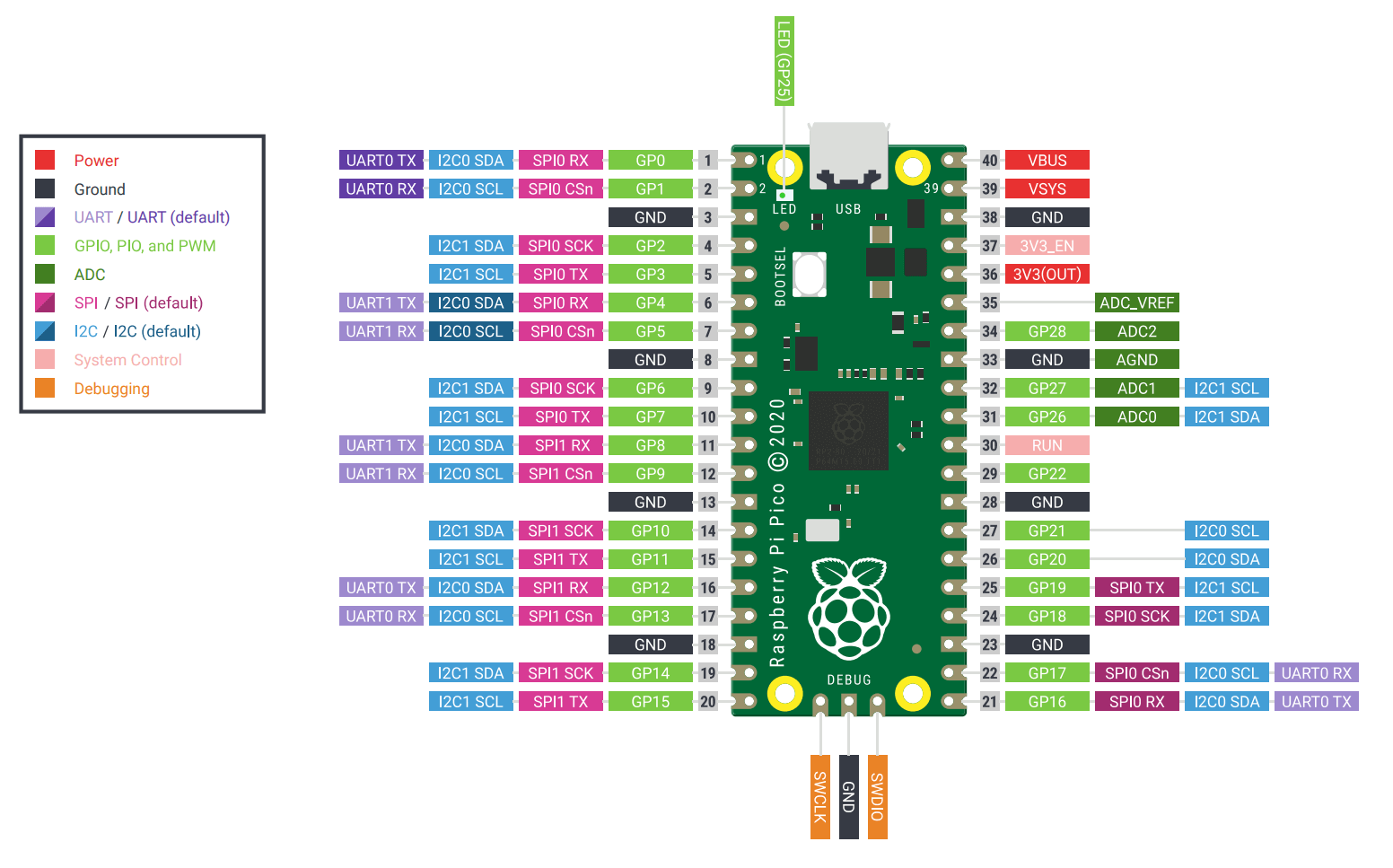
You should get familiar with the Pi Pico documentation and in particular the Pinout diagram for the Pico, shown below:
Tips
-
You can still
console.logand you'll see it in the mock-terminal on the website -
To debug in Bun, you would need to mock any Kaluma-specific APIs, eg with
let pinMode = () => {}; digitalToggle = () => {}
Troubleshooting
Device unresponsive?
-
If your device no longer responds or you can no longer flash to the device, it's possible your code is causing a problem (eg because of an infinite loop) and you need to remove it.
-
You'll need to skip code loading on boot by setting
GP22toGND(ie connecting pins 28 and 29). -
With the Pi Pico booted without loading the code, send a simple JS file that you know works to the Pico with the "Run on Pico" button.
-
You can now disconnect the cable between
GP22andGND. -
If it still isn't responding:
- close mathsuniverse.com/pico and open https://kalumajs.org/ide/ instead for now
- click 'Connect'
- write
console.log(1)as your code - click 'Flash'
- ... you should now be able to return to mathsuniverse.com/pico and 'Flash bootloader' then continue as before
Careful using delay
-
Kaluma lets you pause for eg 1s with
delay(1000), but be very careful using this as it blocks everything and may make you think your device is broken! Be especially careful setting this value to values more than a few seconds. -
Instead, you could consider using
setTimeout()or adding a custom sleep function which does the same thing but doesn't block but requires you to add someawaitandasynckeywords around the place -
let sleep = ms => new Promise(resolve => setTimeout(resolve, ms)) -
Call this function with
await sleep(1000)but you must be within an async function which has the wordasyncin front egasync function doThing () {}orlet x = await () => {}, plus anything calling the function which usesasyncshouldawaitit, like below:let sleep = ms => new Promise(resolve => setTimeout(resolve, ms)) async function doThing () { // ... await sleep(1000) // ... } async function main () { // ... await doThing() // need to await here too as doThing() uses await // ... } main()