Coding · ·
Arrays
What JavaScript (and many other languages) calls an array is different from the definition you need to know about for the A-level exams.
For the A-level exams
An array can store multiple items of the same type (eg all numbers, strings or Booleans) using a single identifier (aka variable name). You specify the length of the array when it is declared, and a chunk of contiguous memory is allocated for it. The length of the array cannot change at runtime - it is static rather than dynamic. Each item in the array uses the same amount of memory, so you know how much memory the entire array requires.
Below is an area of computer's memory, where each small square represents one byte of memory. Shown is an array starting from memory location 0x12, where each item in the array is 2 bytes (for example, a 16-bit signed integer). The array has a length of 5 items, but takes up 10 bytes of memory, because each item is 2 bytes (there are 8 bits to a byte). When creating the array, you need to give it a fixed length, because the memory straight after (starting from 0x1C here) may be allocated for other purposes.
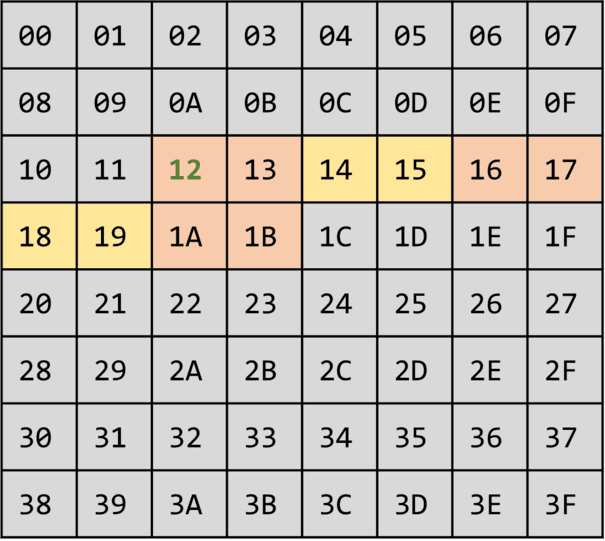
Arrays work like this in systems-level languages like C, C++, Zig and Rust, but not in languages like JavaScript which provide a greater level of abstraction from the underlying memory.
In JavaScript
In JavaScript arrays are dynamic, meaning they can change in length at any time, and items can be of different types. Arrays allow you to store multiple ordered (not necessarily sorted - ordered means accessible as the 1st item, 2nd item etc) items under a single identifier. JavaScript is a dynamic language in which arrays are very flexible and more similar to what some other languages like Python call lists. Arrays are zero-indexed - the first item is stored in index 0 rather than index 1.
let stuff = ['apple', 'carrot'] // makes a new array with 2 items in it
stuff.push('dog') // adds an item to the end of the array
console.log(stuff[2]) // prints 'dog' (the 3rd item of the zero-indexed array)
console.log(stuff.length) // prints '3'
stuff[1] = 'car' // array is now ['apple', 'car', 'dog']
stuff.pop() // returns 'dog' (and removes it); stuff.length is now back to 2
You can also start with an empty arrray:
let stuff = [] // array.length is 0
for (let i = 0; i < 10; i++) stuff.push(i * 5) // array.length is now 10
Or create an array with an initial size:
let stuff = new Array(8) // stuff.length is 8
stuff.push('ant') // stuff[8] is 'ant' (the items before it are empty)
for (let i = 0; i < 10; i++) stuff.push(i) // stuff.length is now more than 8
Advanced: if you want a static array (with an initial fixed length which can't grow, similar to the "For the A-level exam" section above), you can use a typed array. But you're limited to storing items of a fixed number of bits too, such as 8-bit unsigned arrays in this example:
// *** ADVANCED - typed arrays ***
let stuff = new Uint8Array(5) // stuff.length is 5
stuff.push(8) // **ERROR** - not allowed because the array is a fixed length
stuff[2] = 20 // fine
stuff[4] = 258 // stuff[4] is now 2, not 258 as 255 is the max 8-bit unsigned integer
... you almost certainly don't want to use a typed array, unless you have a very specific purpose.
Iterating over arrays
You have various choices for iterating over all items in an array. I usually use for...of unless I need the index of the item too, then I'd probably use a count-controlled loop.
let things = ['ant', 'car', 'dog']

// use a count-controlled loop
for (let i = 0; i < things.length; i++) console.log(things[i])

// iterate over array indexes with for...in
for (let i in things) console.log(things[i])

// iterate over array items with for...of
for (let thing of things) console.log(thing)

// run a function with each item as an argument
things.forEach(thing => console.log(thing))

// as above, with the index as the 2nd argument
things.forEach((thing, i) => console.log(things[i]))
Joining and splitting
It's often useful to join together strings stored in an array, or split a string on a certain character into an array.
let names = ['Dave', 'Amy', 'Zia']
console.log(names.join(', '))

let sentence = 'the quick brown fox jumped over the lazy dog'
console.log(sentence.split(' '))
2D arrays
Arrays can have sub-arrays. Confusingly for those used to having (x, y) in maths, it's common to have arr[y][x] (row-major) rather than arr[x][y] (column-major), ie rows before columns. (In a similar way, graphical coordinate systems often start from top-left in programming rather than bottom-left in maths.)
let arr = []
for (let y = 0; y < 3; y++) {
  let row = []
  for (let x = 0; x < 4; x++) {
    row.push(`row ${y} col ${x}`)
  }
  arr.push(row)
}
/*
  arr is:
    [
      ['row 0 col 0', 'row 0 col 1', 'row 0 col 2', 'row 0 col 3']
      ['row 1 col 0', 'row 1 col 1', 'row 1 col 2', 'row 1 col 3']
      ['row 2 col 0', 'row 2 col 1', 'row 2 col 2', 'row 2 col 3']
    ]
*/
You could also manually make a 2D array:
let arr = [
  ['Dave', 3],
  ['John', 5]
]
console.log(arr[1][0]) // 'John'

arr.push(['Pete', 9])
There's nothing stopping you having unbalanced 2D arrays, or even having (n>2)D arrays.
let arr = [
  ['Jim', 'Jones', [5, 6, 7]],
  [[12, 15, true], 'Frank', [['a', 'b'], [true, 5.4, { some: 'thing' } ]]]
]
... just chuck whatever you want anywhere you want in an array!
Functional programming with arrays
There are a range of methods you can use on arrays in a way which more closely matches the declarative functional programming paradigm.
let stuff = ['ant', 'bag', 'cat']

// 2 ways to run a named function someFunc() on all items in an array
stuff.forEach(v => someFunc(v)) // someFunc() will get 1 argument: the item
stuff.forEach(someFunc) // someFunc() will get 2 arguments: the item; its index

// create a new array with some function applied to each original item
let shouting = stuff.map((v) => v.toUpperCase())

// Do stuff to each item, then reduce the new array down to just one value
let numbers = ['42', '4202', '42420', '505050'] // currently all strings
let sum = numbers.map(Number).reduce((acc, v) => acc + v, 0)
console.log(sum)

// Let's get something that needs wrangling into a different format
let orig = `
  08 02 22 97
  49 49 99 40
`

// Trim leading/trailing spaces, then split on the spaces into an array
console.log(orig.trim().split(' '))

// Same, but now we have an array of numbers instead of strings
console.log(orig.trim().split(' ').map(v => Number(v)))

// Same, but the product of all those numbers
console.log(orig.trim().split(' ').map(v => Number(v)).reduce((acc, v) => {
  return v === 0 ? acc : acc * v
}, 1))